 Ficelle
LiteLLM alternatives: who maintains your routing policy?
LiteLLM alternatives compared by operations rather than feature grids: who writes the routing policy, who absorbs provider changes, and who guarantees that a fallback never bills you. Where LiteLLM stays the better choice, and where a smaller local router with maintained free-only defaults fits better.
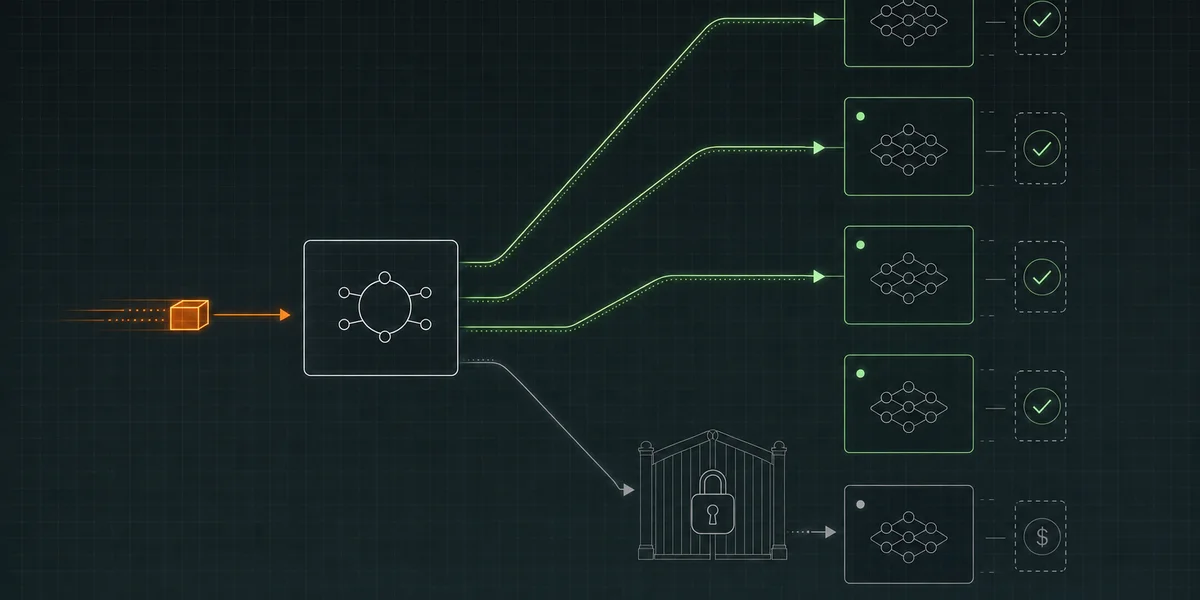
The right LiteLLM alternative depends on which part of LiteLLM you want to stop running yourself. If you need an organization-wide gateway with virtual keys, per-team budgets and an admin UI, LiteLLM is hard to beat, and its closest alternatives are other gateways such as Kong AI Gateway or Cloudflare AI Gateway. If you are one developer or a small team routing agents to free models, the bigger cost of LiteLLM is the policy you have to write and keep current: the model list, the fallback chains, and the guarantee that a fallback never lands on a paid model. A smaller local router that ships those defaults and keeps them maintained, such as Ficelle, fits that case better.
This comparison skips the feature grid. It asks three operational questions of each option: who writes the routing policy, who absorbs provider changes, and who guarantees zero spend.
What does LiteLLM do well?
A lot, and it is worth being precise before looking elsewhere. LiteLLM’s own documentation describes it as “an open-source library that gives you a single, unified interface to call 100+ LLMs”, available two ways: a Python SDK you import into your application, and a proxy that is “a self-hosted OpenAI-compatible gateway” aimed at “platform teams managing LLM access across an organization”.
The proxy is where LiteLLM earns its reputation. The same page lists virtual keys with per-key, per-team and per-user budgets, cost tracking per key, team and user across all providers, load balancing with automatic fallbacks, centralized logging, guardrails and caching, and an admin UI. It is published under the MIT license, so you can run and modify it freely.
If those are the features you use, the alternatives worth comparing are other gateways, and a small router is the wrong replacement.
What do you take on when you run LiteLLM?
Running the proxy means operating a service. Virtual keys, per the virtual keys documentation, “Need a postgres database (e.g. Supabase, Neon, etc)”, a DATABASE_URL in the environment and a master key that acts as the proxy admin key. That is reasonable infrastructure for a platform team and a lot of moving parts for one developer who wants an agent to keep answering.
The larger commitment is the routing policy. In LiteLLM you declare a model_list of deployments, and the reliability documentation explains that “Fallbacks are typically done from one model_name to another model_name” and that “Fallbacks are done in-order”. You choose what each model falls back to, how many failures put a deployment in cooldown (the example comment reads “cooldown a deployment once it fails more than 3 calls within cooldown_time”), and how many retries to allow. That flexibility is the point of LiteLLM. It also means the policy is yours: when a provider retires a model id, changes its free tier or starts billing for a model that used to be free, nothing updates your model_list for you.
Who keeps the policy current when providers change?
This is the question that separates LiteLLM alternatives more than any feature list. Providers break in three recurring ways: rate limits, retired model ids, and capability drift, where a model claims tool support it does not deliver. The provider breakage article covers each failure mode and how cooldowns, quarantine and benchmarked capability checks absorb them.
With LiteLLM, Kong or Cloudflare, you maintain the list of upstream models and react to those changes yourself. Kong describes its product as a “Connectivity and governance layer for modern AI-native applications” that you can configure “on self-hosted Kong Gateway using the Kong Gateway data model and AI plugins”, per the Kong AI Gateway documentation. The Cloudflare AI Gateway documentation lists “caching, rate limiting, as well as request retries, model fallback, and more” for apps you route through it. Both are strong at governance and observability, and in both you choose the upstream models and keep that list current.
Ficelle takes the opposite split. Its open core ships strict-zero routing, the OpenRouter and Nous reference providers, a local dashboard, built-in profiles and live benchmarks, and you bring your own provider keys. Ficelle Pro adds the full curated provider pool with fixes when a provider breaks, plus one-command updates of the provider pack. You request a model by kind through virtual model ids such as ficelle/auto-tools or ficelle/auto-json, and the router picks a working free model behind it.
Can LiteLLM guarantee you never pay?
A budget caps spend once it has started. LiteLLM gives you per-key budgets and cost tracking, which are the right tools when paid models are part of the plan. But a fallback in LiteLLM goes wherever your configuration sends it. If the last entry of a chain is a paid model, a free-tier outage becomes paid traffic until the budget catches it.
Strict-zero routing is how Ficelle closes that gap. Paid fallback is hardcoded off: the config loader resets allow_paid_fallback to false on every load, the router refuses to start if it ever reads another value, and any model that reports billing is quarantined. When a free model rate-limits, Ficelle marks it as cooling down and answers from the best working free alternative when another eligible model is available. When none is, the request fails instead of billing you. There is no paid-model routing on any plan.
That guarantee has limits worth stating. Strict-zero does not promise unlimited free access: free pools run out, and quota providers keep their own billing terms for your account. It also costs quality on some work. In Ficelle’s 76-task benchmark against gpt-5, free routing was quality-safe on 100% of classification tasks, 95% of JSON extraction and 94% of reasoning tasks, but on polished content writing only 50%. Keep that work on a paid model, in LiteLLM or elsewhere, or give it to a human editor.
Which LiteLLM alternative fits which team?
- Platform team serving many users with paid models: stay on LiteLLM, or compare Kong AI Gateway if you already run Kong. Virtual keys, team budgets and spend reports are the job.
- Team already on Cloudflare that wants logging, caching and fallback at the edge: Cloudflare AI Gateway, which its documentation lists as “Available on all plans”.
- Developer who wants a hosted catalog and one bill: a hosted router such as OpenRouter; the OpenRouter alternatives comparison covers that trade-off.
- Developer or small team running agents on free models, locally, with no chance of a paid fallback: a local router with maintained free-only defaults. Ficelle runs on macOS, Linux and Windows and exposes an OpenAI-compatible endpoint on your machine at
http://127.0.0.1:8646/v1, with keys kept locally. Claude Code connects through its Anthropic Messages endpoint, and Continue, Open WebUI, LangChain, CrewAI and the OpenAI SDKs connect through the OpenAI-compatible one.
The two approaches also combine. LiteLLM can keep governing paid models for the organization while individual developers point local agents at a strict-zero router for the work free models handle well.
How to switch from LiteLLM to a local router
- List what you actually use in LiteLLM. If virtual keys, team budgets or the admin UI are on the list, keep LiteLLM for those callers.
- Separate paid and free traffic. Mark which tasks need a paid model (polished writing first) and which are classification, extraction, reasoning or tool calls.
- Install the local router with one command from the GitHub release; the script checks the package against a pinned SHA-256 and needs Python 3. The LiteLLM supply chain attack write-up explains why pinned, verified installs matter for any gateway.
- Point the free traffic at the local endpoint by changing the base URL in your client and replacing concrete model names with virtual ids such as
ficelle/auto-tools. - Delete the fallback chains you no longer maintain for that traffic.
The open core is free under BSL 1.1, with no account and no card. If you would rather have the provider pool, its fixes and the pack updates maintained for you, compare Ficelle plans: Pro is €12 per month after a 14-day trial, or €199 once for a lifetime license.